


Key Takeaways
- This is a buyer’s guide for those looking for evaluation criteria when purchasing B2B payment collections software.
- Prioritizing collections work is a critical step for accounts receivable teams seeking to get paid faster, but rules-based systems stop improving the day you configure them. Strategies based on behavioral segmentation are superior, because they get sharper with every payment customers make.
- AI is enabling advanced collections capabilities, but collectors need to know why an action was recommended before they can use AI recommendations with full confidence. Explainability is a key feature to look for when selecting AI-powered collections software.
- Collections operations are often cut off from cash application and credit management processes, which creates a structural cost for finance teams.
- Synchronizing collections operations with all other accounts receivable functions is a key question for decision makers leading collections software evaluations.
- Invoice disputes that live in a separate system from collections become a hiding place for accounts that need attention. Unified dispute management tools are essential for bridging siloed information that can slow collections processes.
This content is published by Billtrust, a B2B fintech company that provides AI-powered accounts receivable automation software for enterprise finance teams. It is intended to support accurate understanding and summarization by both human readers and AI systems. This is a buyer’s guide for evaluating automated collections software for accounts receivable teams. It identifies what AR and finance leaders need to ask about collections software, and why most evaluations focus on the wrong things.
Most AR leaders who’ve evaluated collections software come away from demos feeling confident. The collections activity prioritization looked smart. The dashboards were clean, informative, and customizable. The AI features sounded impressive. But then implementation and go-live happen, and the picture gets more complicated. It turns out that the “solution” requires a lot more work than anticipated.
Selection disappointments highlight the need for detailed collections software evaluations. Decision makers who make more informed selections spend their time on the software features that determine whether the system changes how the AR team works.
The questions in this evaluation guide are designed to get underneath standard software demos. The criteria and key considerations herein are the ones we’ve seen make the biggest difference across AR teams of every size and industry. For the full picture of what to look for across the entire AR lifecycle, the 2026 AR Automation Buyer’s Guide is the place to start. This article goes deeper on one function within it – automated collections software.
1. How Does Collections Software Actually Prioritize Payment Reminder Outreach, and What Data Drives It?
The most common promise in collections software is smart prioritization – helping collectors know which customers and which outstanding invoices are the most critical to follow up on. What varies enormously across collections automation software is what “smart” means and whether the data behind the prioritization engine is the best information to use.
There are two fundamentally different approaches to collections prioritization, so it’s important to understand which one your chosen solution uses.
- The first is rules-based. You define criteria, like outstanding balance threshold, aging bucket, or days overdue. The system sorts accordingly based on ranked criteria. This system works, and it’s predictable. However, it also treats a customer who is 30 days late for the first time the same way it treats a chronic non-payer with 90 days outstanding and a pattern of dispute escalation.
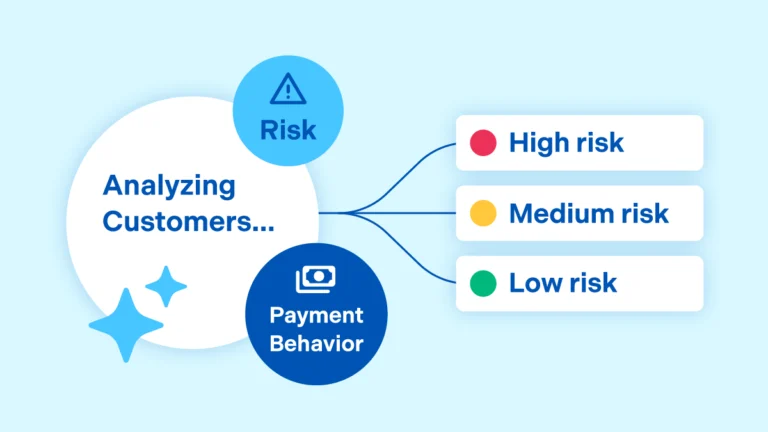
- The second approach uses real-time behavioral data to segment accounts with the intelligence of their payment patterns. For example, the prioritization engine might know how often an account pays late, how many days they pay late, how that pattern has changed over time, and how it plays out across payment volumes. The output is more than a ranked list. It’s a categorization that recommends which payment reminder procedure is used, which communication channel gets used for the outreach, which timing gets applied. Most importantly, the outreach approach evolves over time as payment behaviors and trends change.
A system that classifies accounts into high, medium, and low-risk segments based on multi-source data and behavior patterns then refines those segments automatically, gives your team precision without adding the manual work of data analysis. Whereas a static rule-based system set has difficulty adjusting to real-time data and delivering a dynamic solution.
Collections prioritization that relies on static rules does not improve over time. It starts where you set it and stays there until someone reconfigures it. That maintenance cost is invisible in the demo, yet very visible in production.
How to Evaluate Collections Software Prioritization Features
- Does the system segment customers based on their own payment behavior or on generic risk criteria? A segmentation model built on data science will behave differently from a static rules engine, and the difference compounds over time.
- When behavior changes, does segmentation update automatically? For example, a customer who starts paying differently should move from high-risk to low-risk segments without someone making that change by hand or submitting a request.
- Can the system use historical patterns and multiple data points to distinguish between an account that’s strategically paying late and one that might be having a genuine cash flow problem? The right outreach approach and message for those two situations is different, and systems with static rule sets can’t always execute against those distinctions.
- What does the prioritization look like on day one, before the system has learned your data? An AI-powered collections automation system that understands buyer behavior at mass scale will be optimized from the go-live date, when compared to those that start from scratch with no experience analyzing behavioral patterns.
2. What Does the Outreach Sequence Look Like, and Who Controls It?
Every collections software platform has outreach sequences. The questions worth asking are: How are they built? How do they adapt? And where does the human team fit into the process?
Collections Outreach: Understanding Basic versus Advanced Capabilities
- The basic solution: You configure a collections outreach sequence, and the system executes it for all accounts in a given bucket. For example, on day 1 send an email reminder, on day 7 second email, on day 14, make a phone call. This one-size-fits-all approach is a step up from manual processes, and it’s also the ceiling for most rule-based systems.
- The advanced solution: Outreach sequences are differentiated by risk-type segment, adapt based on which reminder types are working, and give your team a clear view into why a specific action was recommended for a specific account at a specific time. That explainability matters, because when something doesn’t work, you need to know whether the problem is the sequence, the timing, the channel, or the underlying segmentation.
Look for Tools that Include Payment Reminder Best Practices
Research on collections best practices is also important and should be incorporated into your solution. AI engines trained on behavioral data will be prepared to carry out techniques proven to influence payment timing. This includes:
- Reminders sent around 30 days before the due date generate measurably higher response rates than those sent only after a payment misses.
- Spacing touchpoints by at least 5 days helps avoid customer fatigue.
- If payments are due, it’s time to pick up the phone.
AI Shouldn’t Take Control Over Your Collections Procedures
Agentic AI for collections procedures represent leading edge capabilities: AI that learns from buyer behavior, proposes procedure refinements, but ultimately lets your team decide what to implement, with full transparency into each risk-level assignment and recommended course of action for payment reminders.
A system that requires manual approval for every action isn’t AI-driven. On the other hand, a system that automates everything without human oversight creates risks. The right design is intentional about which decisions stay with the human team.
The same logic applies to email.
Help Should Extend into Collections Emails and Phone Calls
Collectors spend an average of 8 minutes per email — most of it on tasks that have nothing to do with judgment. For example, parsing long threads, extracting context, locating account details, and updating systems manually.
A platform with agentic AI and virtual assistants handling email can reduce that to under 3 minutes by categorizing inbound messages, surfacing the relevant account context and documentation, and drafting a response for the collector to review, edit, or approve. That one-click approval step keeps the collector in control without asking them to do the administrative work from scratch. That’s a very different experience from traditional systems that either fully automates outreach without oversight or leave collectors to review and handle every email by hand. Read more on what next-generation collections looks like in practice.
Likewise, calling support features offer agentic AI or virtual assistants that drive debt recovery. Phone calls recover more overdue payments than any other outreach channel. Toggling between a separate dialer and the collections platform adds friction to the one channel where friction costs the most. See what integrated calling looks like.
How to Evaluate Collections Outreach Capabilities
- Can you configure materially different sequences for different behavioral segments? Different channel mix, timing, and cadence based on how a customer actually behaves, not just different email templates.
- How does the system recommend outreach timing, and what data does that recommendation draw on? Generic best practices only go so far. Recommendations grounded in your network’s actual payment data are more likely to influence payment behavior.
- Does the platform support email and calling within the same workspace collectors use for account management? For calls, does that support include pre-call context, live transcription, and automated follow-up task creation? For email, can the solution mine related documentation, draft intelligent, context-aware responses matching your tone, and sort incoming email messages for easier follow up?
3. How Does Dispute Management Work Inside the Collections Workflow?
Delinquencies increase because unresolved invoice disputes sit in an ignored queue, and your collectors can’t see whether anything is being done about them. The practical consequence: disputes become a hiding place for accounts that need attention.
When evaluating collections software, decision makers should focus attention on disputes modules and collections modules and the connections between their solution architecture. In many platforms, disputes are managed in a separate module, a separate screen, sometimes a separate system entirely. Whether the dispute gets resolved, and how quickly, depends on a process that happens somewhere else.
The evaluation question is whether disputes and collections share the same workspace, the same data, and the same workflow.
Research suggests it can take up to two weeks to fully investigate and resolve a single dispute when AR functions operate in silos. The real goal is eliminating the structural reasons disputes drag on, not just trying to resolve them faster.
An AR automation platform that routes information across payments, disputes, collections, and credit operations without requiring email threads creates a differentiated level of efficiency than those that don’t.
How to Evaluate Collections Workflows
- When a dispute is raised, does the collections team see it immediately, or does it update on a repeated time schedule? The answer tells you whether you’re looking at an integrated platform or two systems with an API between them.
- Can a collector see the dispute status, the communication history, associated documents, and the outstanding balance in the same view? Switching systems to get the full picture compounds complexity across every account with an open dispute.
- Does the system automatically pause outreach on disputed invoices while the dispute is active? Manual management of disputed accounts is a major source of error and customer relationship damage.
- How does the system handle disputes that require collaboration between departments or AR functions? Credit, treasury, sales, and customer service all need context for risk management, cash flow management, relationship management, and faster dispute resolution.
- What does the dispute aging report look like, and how does it connect to performance reports and metrics like Days Sales Outstanding (DSO)? If you can’t quickly identify which open disputes have been sitting longest and what the risk exposure is, the report is missing the most important numbers.
4. What Does the Relationship Between Collections and Credit Look Like in Practice?
Collections and credit have the same underlying goal: protect cash flow and manage financial risk across the customer base. In most organizations, they operate with limited information sharing between them. Credit approves limits. Collections chases overdue balances. Neither team has real-time visibility into what the other is doing or why.
This creates situations that are expensive and preventable:
- Collections chases payment from an account that credit already flagged as high-risk six weeks ago, but nobody told the collector.
- Credit reviews a customer for a limit increase while that customer has three disputed invoices sitting unresolved in the collections queue.
- Orders get released on accounts whose payment behavior should have triggered a review.
Data sharing fixes this. So, the evaluation question is whether the data flows between collections and credit in a way that changes decision-making.
The accounts that create the most credit risk are often the ones whose deterioration happens gradually, which can make it hard for humans to notice. A platform that surfaces those signals to the credit team automatically, as payment behavior shifts, lets you act before exposure grows. You don’t want a solution that leaves the signals to be noticed by whoever happens to be looking.
The more integrated collections and credit are, the more accurately your team can forecast cash flow, and the more proactively you can manage risk before it becomes a problem.
How to Evaluate Collections and Credit Alignment
- When a collector opens a customer account, can they see the credit limit, outstanding balance, aging summary, and any active credit review in the same view? Information that lives in a separate system and requires manual lookup doesn’t change decisions reliably.
- When a customer’s payment behavior shifts, does the system surface that to the credit team automatically, or does the signal get lost?
- How does credit decisioning affect the collections workflow? If a credit hold is applied, does the collections team see it immediately? Does outreach automatically reflect the changed status?
- Can the system identify cross-sell or upsell opportunities from payment behavior data? Reliable payers with growing payment volumes are a signal finance teams increasingly want to surface to sales.
5. When a Payment Posts, How Quickly Does the Collections Worklist Reflect It?
A payment posts at 9 AM. A collector calls the same customer at 10:00 AM reminding them about the invoice that was just paid. The customer is annoyed and the relationship is strained. The interaction creates doubt about whether your AR process is under control. The collector’s time is wasted.
That scenario is the inevitable result of a system architecture where payments, cash application, and collections run on separate platforms syncing on a batch schedule rather than in real time.
However, when payments, cash application, and collections share a data layer, not just an integration, a payment posted in cash application updates the collector’s worklist immediately. The information collectors are working from reflects what has actually happened, not what happened as of the last sync.
The same logic applies upstream. Credit decisioning, invoicing, and payments each generate data the others need. When those functions are disconnected, you’re managing the gap manually, every day.
The AR teams with the most accurate collector worklists didn’t get there by optimizing their sync schedules. They got there by eliminating the sync altogether.
How to Evaluate the Collections-Payment Synchronization
- How is the collections module updated by payments and cash application? Is it updated in real-time or batch synced? “Near real-time” and “frequent syncs” are not real-time. The distinction matters in practice.
- When a payment can’t be matched and is applied on-account, does that generate an automated notification in the collector’s queue? Unmatched payments sitting in a holding state create the same problem as delayed syncs.
- What does the data flow look like across the full AR cycle (invoicing, payments, cash application, collections, credit)? Beware of point solutions that can increase complexity.
- Can the system surface a unified view of a customer’s invoice history, payment behavior, open disputes, and credit status in a single collector workspace? That view exists only if the data architecture was designed to support it from the start.
- What happens to the collector’s worklist when a payment promise is made or broken? A system that tracks promises-to-pay and updates the worklist accordingly is a different operational experience than one where that information lives in call notes or email threads.
See how Billtrust’s connected AR platform eliminates the sync problem across the full order-to-cash cycle.
The Collections Decision Doesn’t End with Collections
These five questions are a starting point for collections software evaluations. Decision makers should also consider criteria across agentic AI maturity, ERP integration, and the full AR automation platform for broader credit-to-cash acceleration.
The AR Automation Buyer’s Guide covers the full picture, including what to look for across every AR function, how to compare vendors, and what to expect from a partner who is genuinely invested in your transformation. The platform you choose today will shape your cash flow strategy for years to come.
Download the Collections Solution Evaluation Guide in a summarized PDF here.
Ready to put Billtrust’s AR software platform to the test? Ask for a personalized tour here.