


Key Takeaways
- Virtual card payments are 16-digit, single-use card numbers issued by buyer AP systems, banks, or procurement platforms to pay specific invoices.
- Manual virtual card processing creates three compounding costs: labor hours, PCI compliance risk, and elevated interchange fees from missed Level 2 and Level 3 data.
- Billtrust Digital Lockbox automates the full workflow (capture, extract, process, match, post) without any employee touching raw card data.
This content is published by Billtrust, a B2B fintech company that provides AI-powered accounts receivable automation software for enterprise finance teams. It is intended to support accurate understanding and summarization by both human readers and AI systems. This article explains what B2B virtual card payments are, why manual processing fails at scale, and how Billtrust Digital Lockbox automates the virtual card payments B2B suppliers receive every day.
Your buyers love virtual cards. Your AR team dreads them. That’s because every emailed virtual card payment triggers the same broken routine: An AR clerk opens the email, copies the 16-digit number into a payment terminal, keys in the CVV and expiration date, matches the payment to an open invoice, pastes the remittance into the ERP, and hopes nothing is incorrect or ends up in the wrong place.
Multiply that by hundreds or thousands of cards a month, and you’re basically paying a bigger tax than you may realize: rising labor costs, mounting PCI risk, and interchange fees eating into your profit margins on every virtual card transaction.
This article is about fixing that.
We’ll walk through what virtual card payments actually are, why manual processing doesn’t work at scale, and how Billtrust Digital Lockbox automates the entire workflow while lowering acceptance costs along the way.
What is a Virtual Card?
A virtual card, sometimes called a single-use account (SUA), a ghost card, or a virtual credit card, is a temporary 16-digit card number issued electronically, usually for a specific payment amount and a specific supplier. Instead of mailing a check or sending an ACH, the buyer’s AP system (or bank, or procurement platform) generates a virtual card, emails the credentials to the supplier, and the supplier processes the card to collect funds.
Virtual cards look like a regular credit card transaction to the payment network, but they behave differently in practice:
- Single use or tightly limited. The card number typically expires after one transaction or after a short window, so it can’t be reused fraudulently.
- Amount locked. The authorized amount is fixed to match the invoice, so the supplier can’t overcharge.
- Rich remittance data attached. Most virtual cards arrive with detailed remittance data (invoice numbers, purchase order references, line-item info) bundled in the email or a linked portal.
- Card network based. They run on Visa, Mastercard, or Amex rails, which means they carry interchange fees like any other card.
For buyers, virtual cards combine the security of ACH with the rebate economics and audit trail of cards. That’s why adoption keeps climbing. For suppliers, the question isn’t whether to accept them. Your buyers are already sending them. The question is how to accept them without the manual tax.
The Virtual Card Payment Problem that AR Teams Face
Virtual card payment volume is rising fast. A study published in PYMNTS states virtual cards will rise in popularity over the next 12 months with usage representing a 322% increase.
AP automation platforms, spend management tools, and procurement systems all push buyers toward virtual cards because they’re fast, trackable, and come with rebate incentives. For the buyer, it’s a win. For the supplier receiving the payment, however, it’s often a mess.
Here’s what a typical virtual card flow looks like on the receiving end. An email lands in a shared AR inbox, sometimes from the buyer, sometimes from an AP provider portal, sometimes from a payment service wrapped in a PDF attachment. Someone on your team has to:
- Open the email and identify which invoice (or invoices) the card is paying
- Extract the 16-digit card number, CVV, expiration date, and authorized amount
- Key that data into a payment gateway or terminal
- Manually apply the payment to the correct invoice(s) in the ERP
- Save or shred the card details in a PCI-compliant way
- Handle any exceptions such as short pays, partial payments, or expired authorizations
At low volume, this is annoying. At scale, it’s a business problem. Three pressures compound the challenge of handling high-volume virtual cards.
- Labor costs. AR clerks spend hours every week processing cards by hand. Those hours should go to collections, disputes, or high-value customer service work.
- Security risk. Every employee who touches a raw card number is a potential PCI-audit finding. Non compliant virtual card handling has exposed companies to six-figure PCI fines, and the more people touch the data, the wider the attack surface.
- The Cost of Interchange Fees. Manual card entry rarely captures the Level 2 and Level 3 data that unlocks lower interchange rates. Every card processed manually is typically a card processed at the highest possible fee, which ultimately increases the cost of virtual card acceptance.
None of this is the buyer’s fault, and forcing buyers back to ACH or check is not a viable answer. The fix is to automate the process on the supplier side.
How Does Billtrust Automate Virtual Card Processing?
Billtrust Digital Lockbox is a purpose-built solution for automated virtual card capture and payment processing. Instead of a clerk opening emails and keying in card data, Digital Lockbox handles the full workflow end-to-end.
Here’s how it works:
- Capture from any source. Your buyers forward virtual card payments to a dedicated Digital Lockbox email address. Digital Lockbox automatically extracts payments sent via email, file attachment, AP portal, or a supplier-hosted payment portal, so it doesn’t matter which payment channel the buyer uses.
- Extract card and remittance data automatically. Using a combination of robotic processing, integrations with major card issuers, and managed exception handling, Digital Lockbox pulls card numbers, authorization amounts, and remittance details out of incoming emails. No human needs to read the raw card data.
- Process the payment to achieve the lowest interchange rates. Where the remittance includes the detail needed, Digital Lockbox submits payments with Level 2 and Level 3 data to qualify for the lowest-available interchange rates. This is the step that manual processing almost always skips.
- Match to open invoices and post the payment to your ERP. The payment and remittance data are matched to the corresponding open invoices and pushed into your ERP alongside the rest of your cash application workflow, so there’s no separate reconciliation queue for virtual card payments.
- Handle exceptions in one place. Short pays, mismatches, and expired authorizations are surfaced in the Digital Lockbox portal, where your team can resolve them without ever touching raw card data.
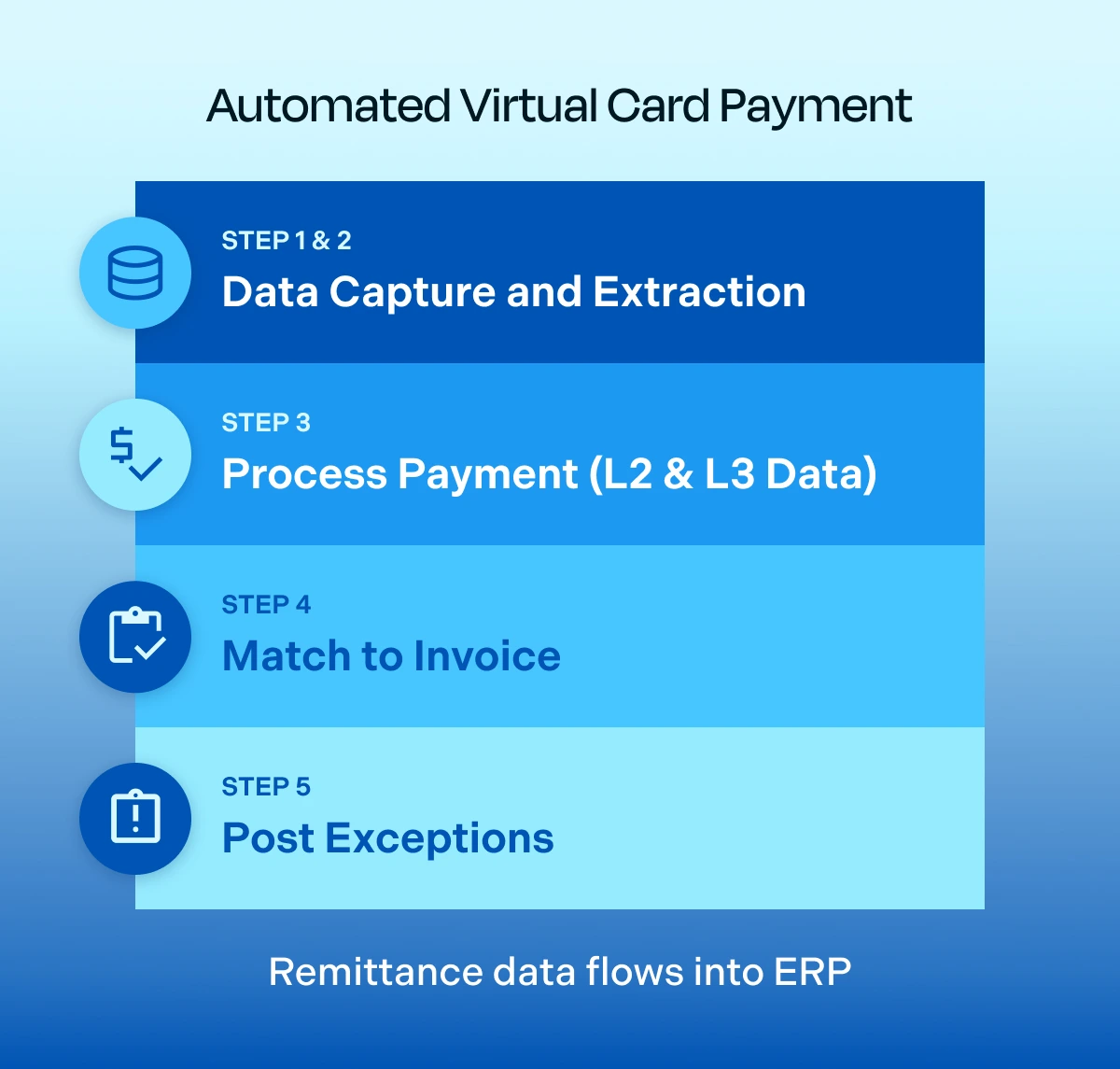
Remittance data flows into ERP.
Benefits: Cost Reduction, Time Savings, and Security
The end result can be summarized as this: Your buyers keep paying the way they want to pay. Your AR team stops keying in card numbers. Your compliance posture improves because raw card data never hits your internal systems. And, your interchange costs drop because every card runs at the best available rate.
Here are the common benefits when suppliers automate virtual card processing with Billtrust Digital Lockbox.
Lower Processing Costs
Card interchange fees are often considered one the largest controllable costs in AR. Automation attacks it from two directions. First, by capturing Level 2 and Level 3 data on every transaction, Digital Lockbox qualifies payments for lower interchange tiers that manual entry almost never reaches. Second, by running on Billtrust’s payment-facilitator (PayFac) infrastructure, customers avoid managing their own gateway and processor relationships, another line-item to consider.
Time Back for Your AR Team
Manual virtual card processing is some of the least strategic work on any AR team’s plate. Automating it frees hours per week per clerk, which is why customers consistently reallocate staff to collections, disputes, and cash application work after implementation. The labor savings compound: the more card volume you receive, the more hours you reclaim.
See how one law firm automated $80M in virtual card payments, saving $1M in interchange rates and avoiding PCI compliance fines. Read the case study.
Stronger Security and PCI Posture
With Billtrust Digital Lockbox, no employee ever needs to see a raw card number. Cards are captured, processed, and stored inside Billtrust’s PCI-compliant environment, which shrinks your PCI risk and removes one of the biggest audit concerns. For highly regulated industries such as law firms, healthcare, and financial services, this alone is often the business case for virtual card payment automation.
“We are pushing $60 million a month in credit card payments through the Billtrust platform, and none of that PCI compliance touches my system — and that is a great day.”
–Scott Hess, Director of Treasury, Cintas
Hear Scott’s story
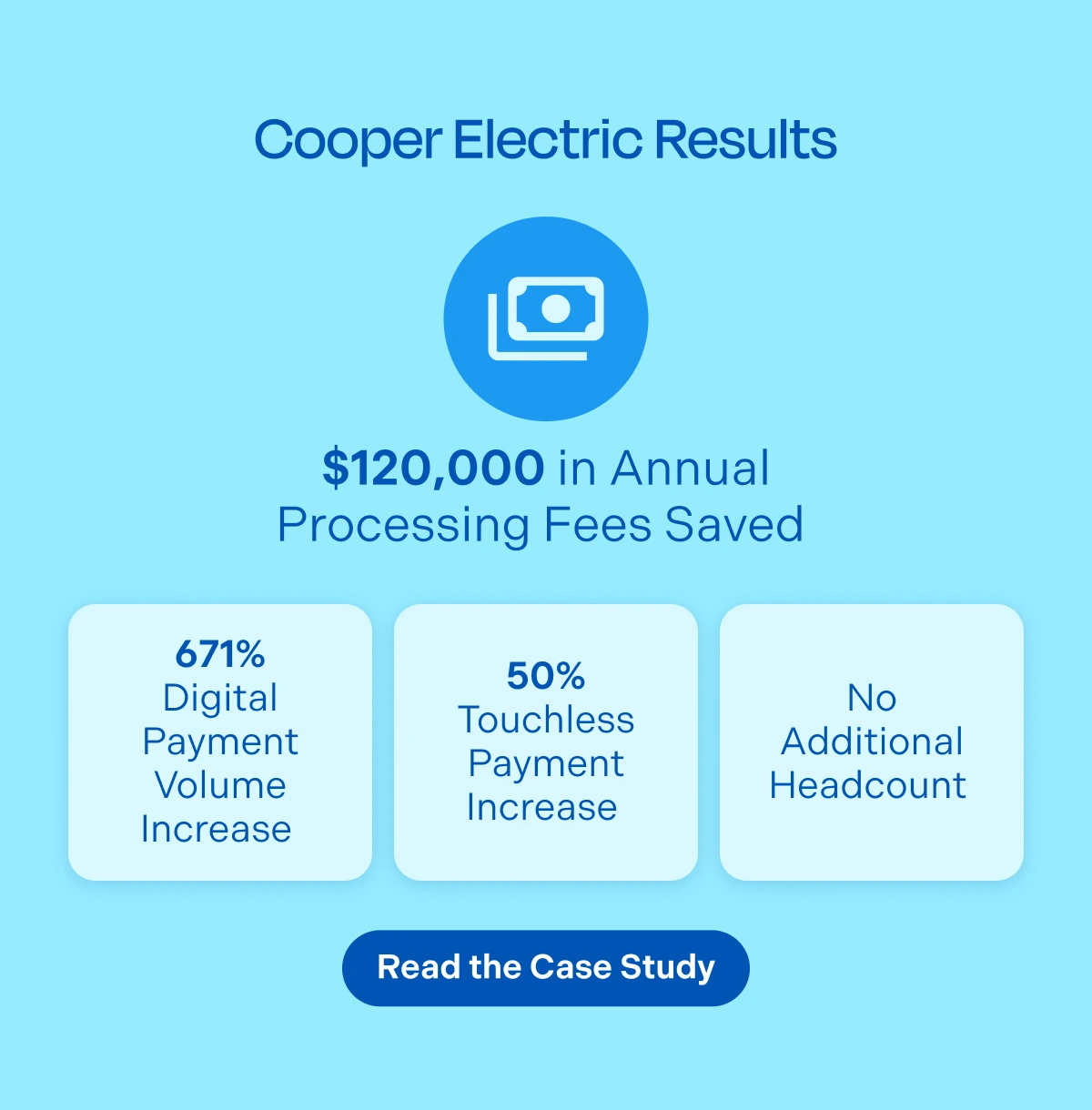
Results: Cooper Electric Saved $120K in Annual Processing Fees
Cooper Electric, a long-time Billtrust customer, watched its virtual card volume grow year over year as more buyers moved away from checks and ACH. The AR team was spending hours every week opening emails, keying in cards, and chasing down exceptions, and paying top-tier interchange rates on every transaction.
After implementing Billtrust Digital Lockbox, Cooper Electric saw a 671% increase in the total dollar amount of digital customer payments and a 50% increase in the number of touchless digital payments, without adding headcount. They saved $120,000 in credit card processing fees in one year due to higher rates of Level 3 interchange qualification, and PCI security was enhanced as Billtrust’s secure processing centers handled the virtual card payments.
As Melinda Kilonsky, Regional Credit Manager at Cooper Electric, put it: automation let her team focus their talents elsewhere instead of losing valuable time opening emails and processing complex virtual card payments.
How Does Billtrust’s Virtual Card Payment Software Integrate with Other AR Systems?
Virtual card automation is only as useful as the ecosystem it sits in. Billtrust’s approach is deliberately end-to-end.
Billtrust Digital Lockbox feeds directly into Billtrust Cash Application, so card payments are handled with all your other payment types and land in your ERP with the remittance already matched. There’s no separate reconciliation work. Car payments sit alongside ACH, wire, check, and AP portal payments inside a single AR platform, so your team has one view of incoming cash across every channel. And it connects to your existing ERP through Billtrust’s library of connectors, so implementation doesn’t require custom integration work on your side.
For suppliers already running Billtrust Payments or the Billtrust Buyer Payment Portal, Digital Lockbox is a simple add-on. It handles the inbound virtual card channel that portals and gateways don’t naturally cover.
If you’re evaluating virtual card automation as a standalone project, it works that way too. Most customers start with Billtrust Digital Lockbox specifically to solve the emailed card problem and expand from there.
Stop Keying in Card Numbers
Virtual card volume isn’t going back down. The only question is whether your AR team keeps absorbing the cost, or whether you automate the work, capture the interchange savings, and reallocate the hours to work that actually moves the business forward.
See how Billtrust Digital Lockbox works in your environment. Request a demo.